
Induction completion from about 40% to nearly 100%
A national charity's monthly induction seminar, rebuilt as an accessible SCORM course that staff take on any shift, and that their own team keeps up to date.
A seminar shift workers couldn't attend
Once a month on a weekday morning, built from a slide deck that was hard to keep current.
An accessible, self-editable course
Interactive, accessible to WCAG 2.1 AA, built around their people, with a simple editor for their L&D team.
Near-full completion, praised by the CEO
Feedback was "overwhelmingly positive", and the senior leadership team and the CEO commended the work.
From a monthly seminar to an induction every new starter can take
Walsingham Support ran its staff induction as a seminar once a month. Staff on weekend and evening shifts often couldn't attend. We rebuilt the PowerPoint as an accessible SCORM 1.2 course that their L&D team updates in house.
An induction many staff couldn't attend
Walsingham Support provides care seven days a week. New starters were inducted at a seminar held once a month, on a weekday morning. Staff who only work weekends or evenings often couldn't get there, and attendance sat at around 40%.
The content was a 25-slide PowerPoint, mostly images of text. Some of it changes regularly: trustees, the executive team, the regional structure and the yearly strategic goals. The L&D team wanted to make those changes themselves, without commissioning a developer each time.
One seminar a month, on a weekday morning
Illustrative week for the shift patterns Furqan described
"It is also important to us that we would have an agreement as to how the course can be modified / tweaked post course, as changes would be needed for instance region structures or people changed."
Furqan Zaman, Learning and Development Manager, in his first email
A course that works on any device and with any input
We wrote the course in code, without an authoring tool. That let us build each interaction the content called for. All the text is live text rather than images of text, so screen readers can read it and it reflows on a phone. The whole course is keyboard navigable. It reports completion to their LMS and resumes where the learner left off.
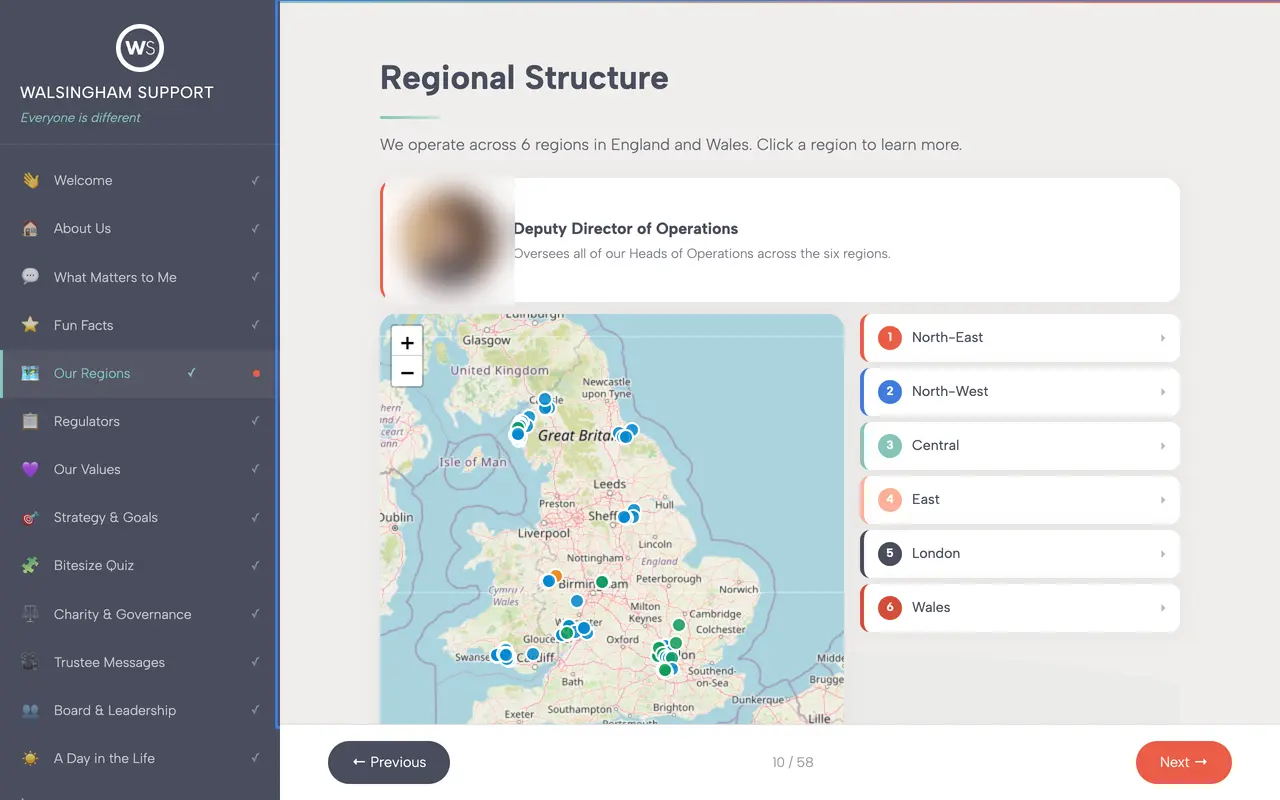
Their own map of services across six regions, embedded live, so the course stays current as services change.
Updates without a developer
The original plan put all the editable content in one structured file: names, photos, regions, quiz questions, logo and brand colours. Partway through the build we went further and added a browser-based editor. The L&D team edits the text, exports a new SCORM package and uploads it to the LMS.
The editor got its first real test during user testing. Furqan made most of the feedback changes himself. He sent only one request back to us, which was to add model answers to the final assessment.
- 1
Open the editor
In a browser, with nothing to install.
- 2
Change the content
Names, photos, regions, quiz questions, goals.
- 3
Export the package
A new SCORM 1.2 zip that is ready to upload.
- 4
Upload to the LMS
The layout adjusts to the new content.
Their team changes
- Staff, trustee and executive names, titles and photos
- Regional structure and contacts
- Text within each section, and the yearly goals
- Quiz questions and answers
- Logo and brand colours
We step in for
- New sections or new types of page
- Changes to layout, navigation or interactions
- Accessibility or SCORM compliance updates
- A full rebrand
"This is a really useful feature for us going forward, and I think it will make maintaining and updating the induction much easier. It is certainly much more practical than having to edit the SCORM file itself every time we need to make a change."
Furqan Zaman, Learning and Development Manager, on first using the editor
Collaborative from the first call to launch
A course like this depends on content from busy people: a CEO, trustees, regional leads. We built the structure first and added each video and section as it was ready, so the project never waited on one missing piece.
Shape it together
We went through their deck slide by slide and agreed what to make interactive, what to make accessible, and what their team would edit themselves.
See it early
They had a working preview before the project kicked off. From then on, feedback was on the real course, not on mock-ups.
“Wow this is coming along very nicely. I like the design!” — Furqan
Build as content lands
We tested on their own LMS from the start and slotted in videos and sections as their stakeholders delivered them.
Test, launch, hand over
We ran user testing with their staff and launched to new starters. We handed over an editor their team was already using.
“All feedback received has been overwhelmingly positive.” — Furqan
"The results speak for themselves"
"Historically, this training was delivered as a seminar, achieving only around 40% attendance. Since launching the new solution, we have been trending towards 100% completion, with feedback overwhelmingly positive."
Is your induction still a PowerPoint that people miss?
Send us the deck. In 15 minutes we'll tell you what we'd build and what your team could edit themselves.